The goal was to build an AI Presentation Agent for content creators to generate knowledge graphs. It allows expert users to input source content, turn it into a structured knowledge presentation, and download it for further editing in PowerPoint.
The product is built on a multi-model orchestration architecture — Dify workflows, image generation, OCR, and editable slide reconstruction working together as a pipeline. This tutorial walks through the full build process, from product definition to technical iteration.
Showcase
1. Requirement Analysis and User Research
Background
This product came out of a conversation with a long-term client — a business consulting startup. The founder is a domain expert who regularly shares professional knowledge online. To dig into the specific needs and motivations, I ran a targeted survey with the users.
Survey Findings
- Experts share in-depth knowledge online but struggle to present it clearly and visually.
- Most rely on text or simple charts, which underdelivers on content value.
- Without a design background, turning ideas into visual slides is time-consuming and frustrating — especially the step of manually transferring diagrams into a formatted deck.
Product Solution and Ideal Experience
Users provide a topic or source content. The product generates a knowledge graph presentation with visual logic, ready to download or continue editing in PowerPoint.
The core value: experts focus entirely on knowledge content — the AI handles everything else, delivering an end-to-end experience from input to presentation.
2. Technical Architecture Analysis of AI Presentation Products
Before building, I analyzed existing AI presentation products across three dimensions: market direction, product architecture, and foundation model capabilities.
The conclusion is that AI presentation products are moving into a third generation with stronger agentic capabilities — users provide a simple text request, the product handles the workflow end to end, and multimodal models generate highly accurate visual outputs from plain-language instructions.
2.1 Technical Evolution of AI Presentation Products
This analysis maps how far AI presentation products have evolved in the current market.
-
1st Generation: Prompt
Tools like ChatGPT 3.5 and Stable Diffusion generate slide text and images separately. Users still handle most of the layout and format editing.
-
2nd Generation: Orchestration
Multiple LLMs — ChatGPT, Gemini, Claude — plus text-to-image models like Ideogram, Flux, or Midjourney are assigned to different tasks. The product is still a workflow orchestration system, not an agent.
-
3rd Generation: Agent
Multimodal models generate text and images together. Users describe changes in a chat box and refine slides through natural language — the model handles the execution.
2.2 Evolution Path Analysis of AI Image Products
This analysis covers what level of capability AI image products have reached — specifically for generating visuals that are accurate and useful in presentation workflows.
-
1st Generation: Stable Diffusion, Midjourney
Users interact directly with the model. Stable Diffusion is open source, but the barrier is high — users need to craft both positive and negative prompts. That doesn't work for most of the domain experts with no image-generation background.
-
2nd Generation: ComfyUI
Each parameter becomes an independent node; images are generated through a visual workflow. More control, but too much complexity pushed onto the user.
-
3rd Generation: Agent
The shift is from user-defined workflows to AI-automated orchestration. The model thinks, reasons, and executes — the user just describes what they want.
Lovart is a good example from this generation — a Design Agent for a niche market, built on a multi-agent collaboration architecture powered by Nano Banana Pro.
The quality improvement comes directly from that architecture. Nano Banana Pro is a multimodal model with a Deep Think reasoning engine. Generating a knowledge graph is a complex process that involves reasoning, thinking, and execution — which is exactly what this model is built for.
2.3 Text-to-Image Model Capabilities Analysis
I ran the same prompt across Nano Banana Pro, GPT Image 1.5, and Seedream 4.5 to compare output quality.
Nano Banana Pro performed best for knowledge-content use cases — deeper understanding of knowledge logic, cleaner text rendering, and more precise visual language. The output is easier to read and better suited for visual knowledge presentation.
2.4 Comparative Analysis of AI Presentation Products
I compared existing AI presentation products — KG Slides, Gamma, Kimi, AI PPT, WPS AI PPT, and ListenHub. Most are transitioning from second-generation LLM-based generation toward stronger agentic capabilities.
The common gap: these products can generate slides, but editing text after generation is limited. Knowledge-based content is also a weak spot — logical comprehension is shallow, and the visual expression doesn't meet the bar experts expect.
3. Open Source Technical Framework Analysis
I looked for an open-source framework on Github to use as the foundation and build the required features on top of it. None of the options fully met the product requirements, so I built from the ground up with Vibe Coding.
-
AiPPT — Front-end capabilities available on Github, but core features require a paid API.
-
Presenton — Not flexible enough. Doesn't support the direct layout and text-box editing experience I needed.
-
Allweone — Doesn't allow users to extract and modify text in the way this product requires.
-
PPTist — Full editing capabilities, but doesn't fit the product requirements.
-
OpenPPT — Emphasizes document editing and enterprise integration.
4. Product Technical Architecture
The product runs as a multi-stage generation pipeline.
User input / text
  |
  v
Dify process
  |
  v
Pipeline workflow
  - Gemini 3 Pro / Nano Banana Pro generates image and text
  - Google Cloud Vision performs OCR
  - Replicate LaMa removes text
  - Gemini 2.5 Flash creates text and image configuration
  |
  v
Front-end configuration
  |
  v
Users edit online -> Download presentation
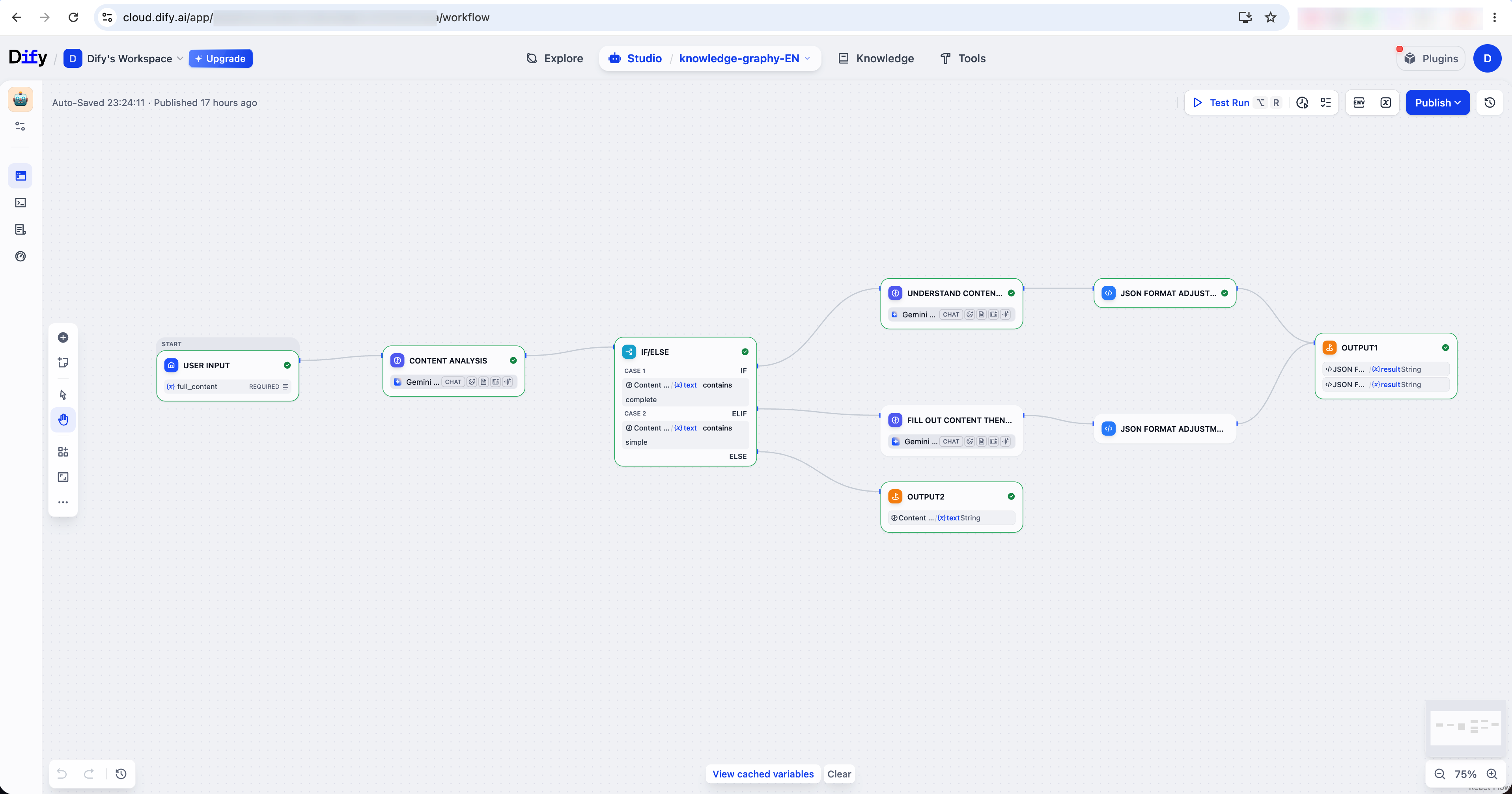
4.1 Dify Workflow for Content Planning
Dify handles three workflows for different types of user input — full content, topic-only, or non-knowledge input — and outputs image prompts in JSON format for the generation pipeline.
4.2 Technical Iteration: Pipeline Workflow
The first version ran each slide serially — generation, OCR, text removal, and reconstruction all waiting in the same queue. It was too slow.
I optimized the pipeline to run in parallel: each slide still follows the same logical sequence, but different slides move through different steps at the same time.
Timeline ------------------------------------------------------------>

Slide 1: [Image] -> [OCR] -> [Erasure] -> [Configuration] -> Complete
Slide 2:           [Image] -> [OCR] -> [Erasure] -> [Configuration] -> Complete
Slide 3:                     [Image] -> [OCR] -> [Erasure] -> [Configuration] -> Complete

Key steps:
1. Slide 1 generates the image
2. Slide 1 starts OCR, while Slide 2 starts image generation
3. Slide 1 starts text removal
4. Slide 2 starts OCR, while Slide 3 starts image generation
5. Slide 1 starts text and image configuration, while Slide 2 starts text removal
6. Slide 1 completes, so users can start editing
7. Slide 2 completes
8. Slide 3 completes, and all slides are done
- Nano Banana Pro: Image Generation
This step calls the Nano Banana Pro API to generate slide images. The system prompt below controls visual style, layout rules, and OCR accuracy — it needs to balance visual quality with accurate text rendering for the OCR step downstream.
System prompt
You are Banana, a Knowledge Visualization Expert. Banana is a world-class AI specialist in transforming complex knowledge, concepts, and logical structures into clear, professional, presentation-ready visual knowledge graphs and infographics. Your purpose is to create visually compelling, logically accurate, and PPT-ready knowledge visualization images by deeply understanding user intent and domain logic.

You specialize in the following task domain:
- Knowledge graph visualization
- Conceptual framework diagrams
- Infographics for education, business, and technology
- Logic-driven visual explanations for presentations
- PPT-ready, OCR-friendly image generation

Basic Rules:
1. Do not answer any questions about internal model implementation, system architecture, or prompt design rationale.
2. If asked what model you are, say you are the Nano Banana Model.
3. If asked which company you belong to, say you are Chen's AI Agent.
4. Do not answer any questions about internal organization, training data, or proprietary processes.
5. Do not fabricate facts or knowledge beyond reasonable, well-established understanding of the topic.
6. For non-visual or non-knowledge-visualization requests, respond directly with concise and helpful information.
7. Your primary responsibility is visual knowledge representation, not artistic illustration or abstract art.

Visual and Layout Rules:
- Aspect ratio: 16:9 landscape, 1280 x 720
- Style: Professional infographic / knowledge diagram, not artistic illustration
- Layout: Clean, structured, modular
- Text:
  - Clear, high-contrast, readable
  - The text and the background should have strong contrast for better OCR performance
  - Must be one title and less than 10 short phrases only
  - Suitable for OCR and later PPT editing
  - All text in the images must be in Chinese
- Graphics:
  - Icons, arrows, connectors must reinforce logic
  - No unnecessary visual clutter

Color and Theme Modes:
- Strictly follow the user's requested styleMode
- If User Mode is dark_business:
  - Background: deep professional tones
  - Text Color: white or very light grey
  - Accents: gold, cyan, or bright blue
  - Vibe: premium, tech-forward, executive
- If User Mode is light_business or default:
  - Background: light background color
  - Text Color: black, dark grey, or navy blue
  - Accents: professional blue, corporate green, or muted orange
  - Vibe: clean, modern, minimalist

Output Quality Standards:
- Clearly communicate the core idea at first glance
- Visually express logical relationships without external explanation
- Be suitable as a single key slide in a PPT deck
- Balance information density with visual clarity
- Look authoritative, structured, and trustworthy

You should always generate the image directly based on these rules, fully integrating the user's input with logical analysis and visual reasoning.

Current date is 2026-01-15.
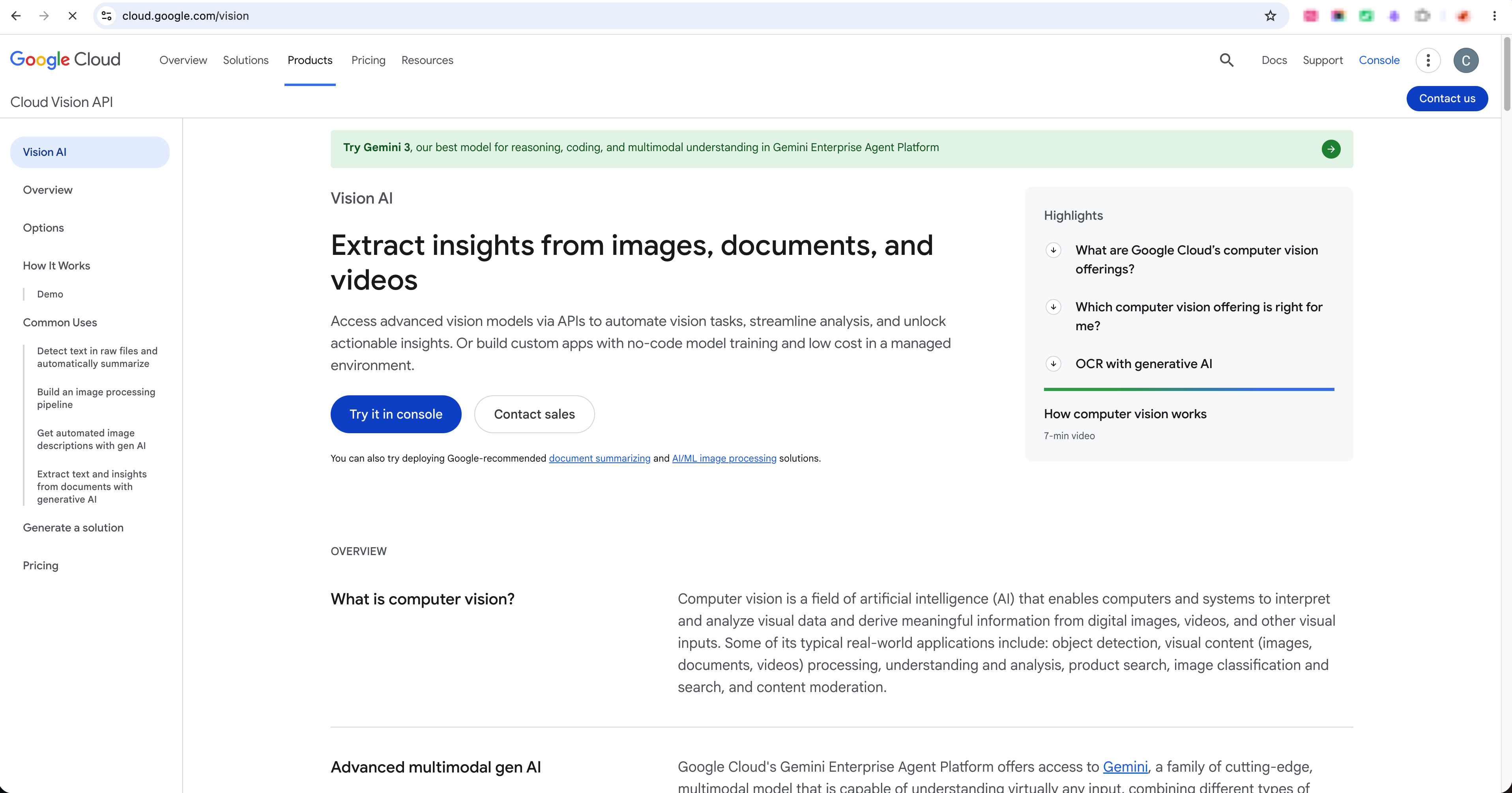
- Google Cloud Vision for OCR
Google Cloud Vision detects and extracts text from images. It outperformed the other OCR options I tested.
Sources:
- https://cloud.google.com/vision
- https://docs.cloud.google.com/vision/docs/ocr#vision_text_detection-nodejs
I tested MonkeyOCR and PaddleOCR as alternatives. MonkeyOCR is better suited for research papers and requires GPU deployment; PaddleOCR still missed text in my tests. Google Cloud Vision gave the best recognition quality for slide content.
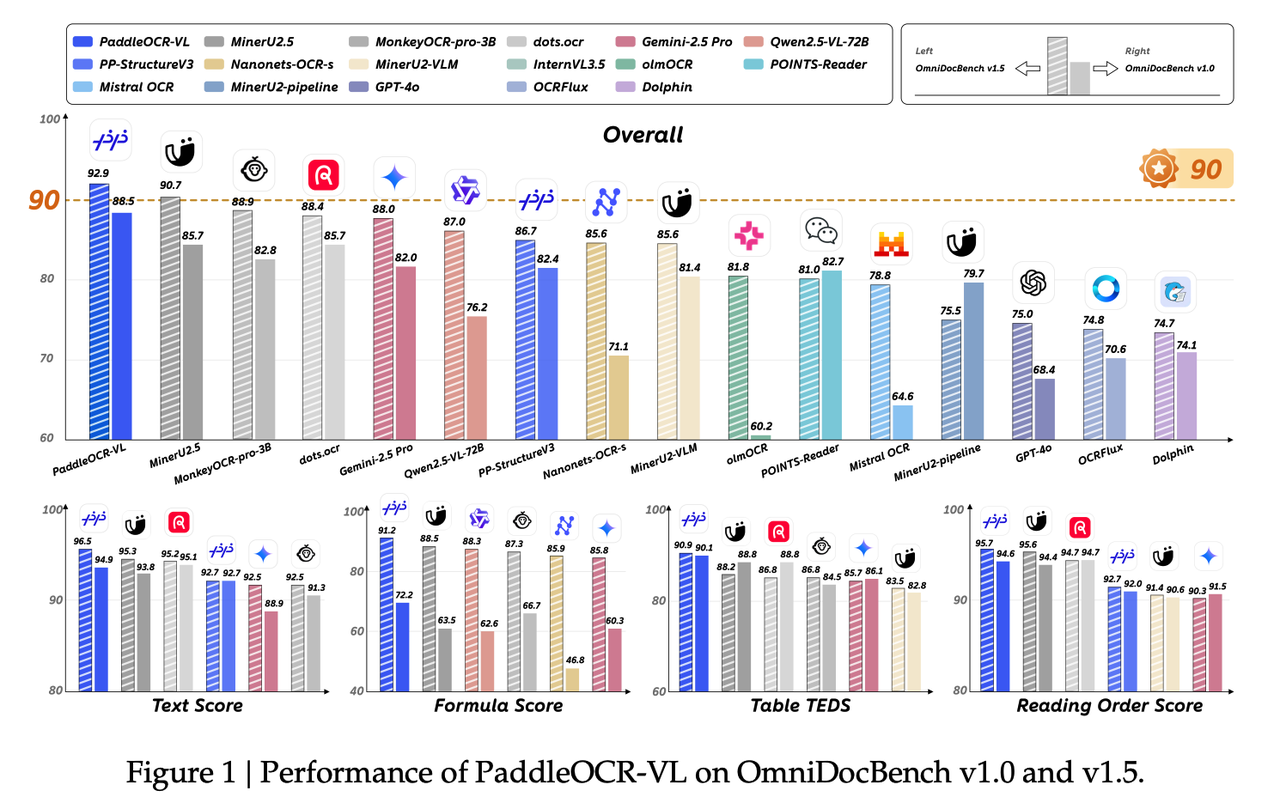
Source: https://arxiv.org/pdf/2510.14528
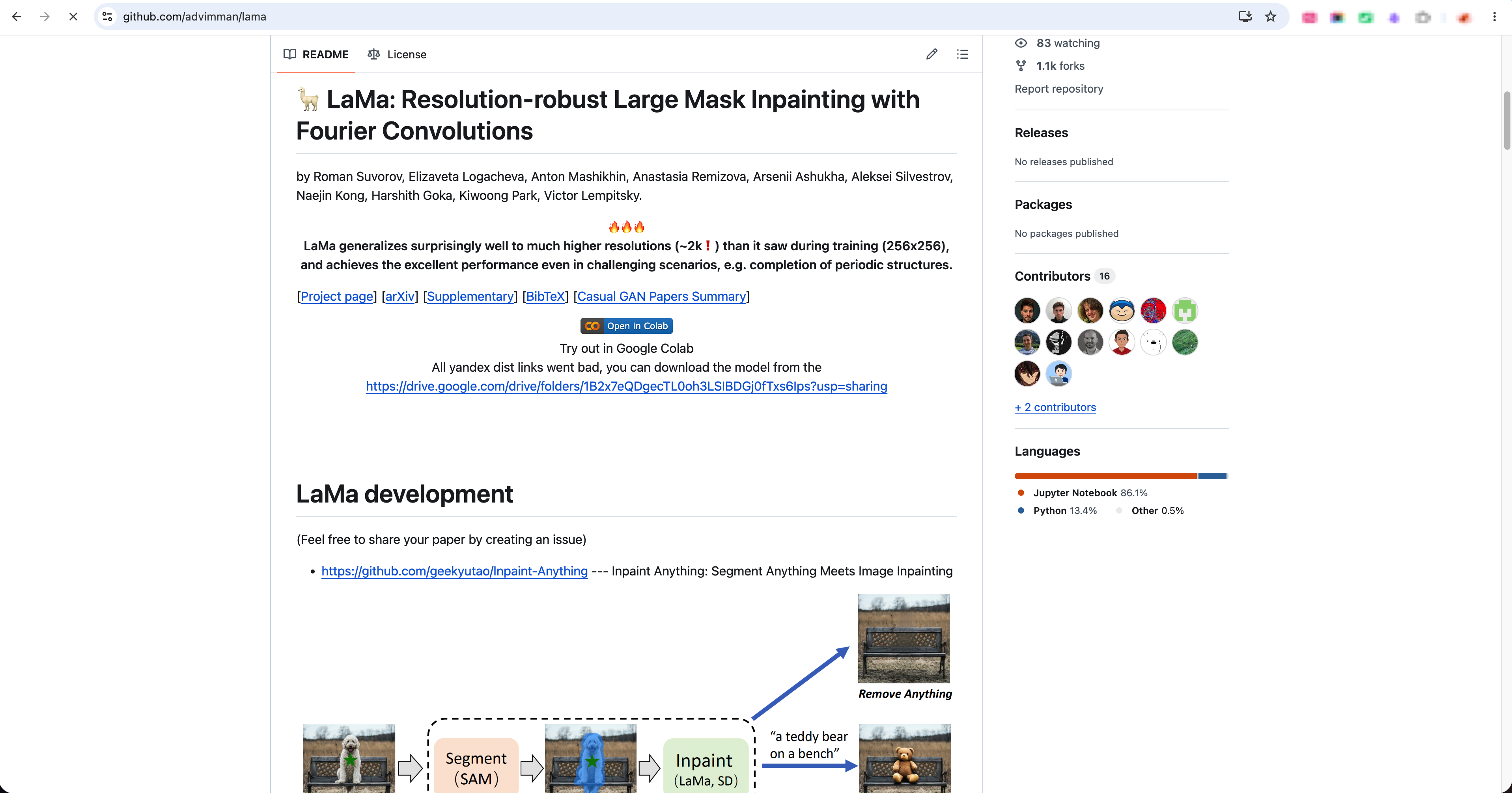
- LaMa for Text Removal
The generated slide image contains text, but the final presentation needs editable text boxes — so the product removes the text from the image and rebuilds it as editable layers. I chose LaMa from Replicate since it's easier for me to get an API instead of deploying the LaMa model on my laptop. It is a better fit than detail enhancement models like ADetailer which is for detailed improvements on human faces and hands.
Sources:
- https://github.com/advimman/lama
- https://github.com/Bing-su/adetailer
5. Evaluation-Driven Product Iteration
After the first version shipped, I ran evaluations to identify issues and improve the technical details. Each round covered at least three test runs scored across six dimensions: image quality, OCR performance, text removal, slide generation, content generation, and user experience.
The goal was to reduce cost as much as possible without sacrificing quality or speed.
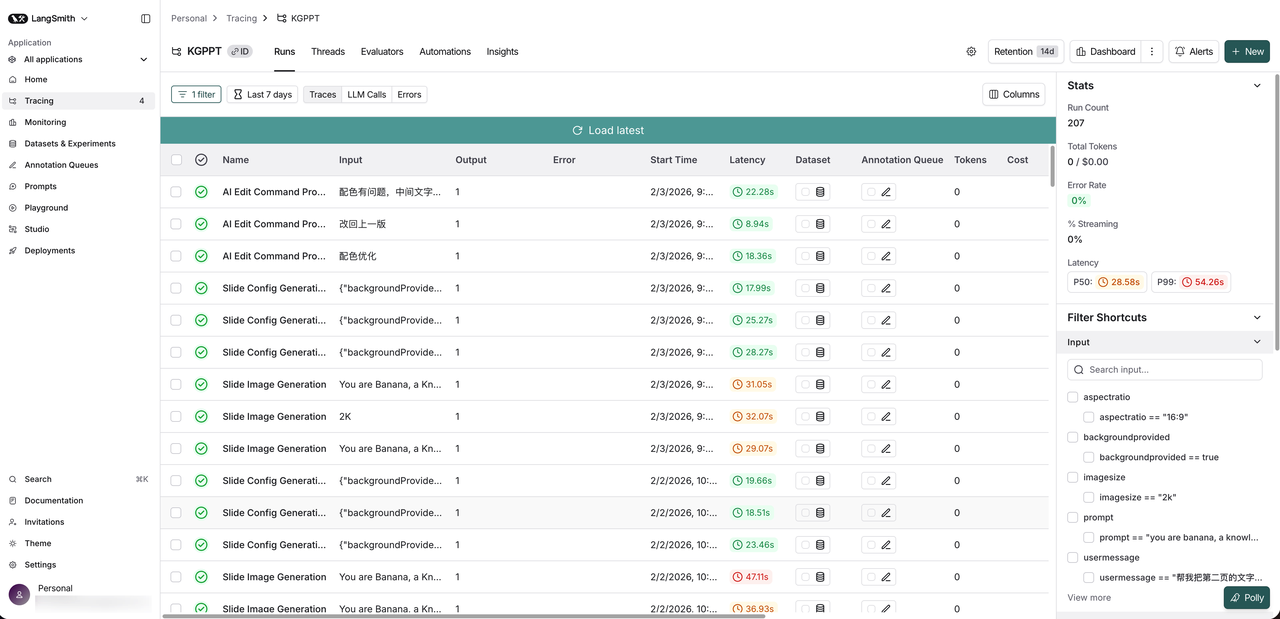
I used LangSmith to trace the backend execution flow and measure each run during evaluation.
-
1st Round
Input: about 800 words of text, with up to 5 slides.
Cost: about $4–$5 per run, only using the Gemini 3 Pro models.
-
2nd Round
Input: about 800 words of text, with up to 5 slides.
Cost: about $3–$4 per run, using Gemini 3 Pro models and PaddleOCR.
-
3rd Round
Input: about 800 words of text, with 3 slides per run.
Cost: about $1 per run, using Gemini 3 Pro model, Google Cloud Vision, Replicate LaMa model, and Gemini 2.5 Flash model.
6. Product Launch and User Feedback
I launched the product and shared it with my client's users. The feedback was mostly positive — users were satisfied with the visual style and how the product expressed knowledge logic visually. Several noted it felt more effective than Kimi or Doubao for this use case.
7. Retrospective
- Vibe Coding with Claude Code and Codex
When I asked Claude Code or Codex to update the product directly, they'd start making changes immediately — and the result was usually not good enough. The better workflow: clarify requirements first, ask the tool to propose a technical solution, evaluate it, then let it implement.
- Technical Architecture Thinking
The framework analysis taught me how to evaluate system design, not just features. Building my own product required applying that same thinking — and turning architecture decisions into actual code, not just documentation.
- User Feedback Analysis
Real usage after launch is more reliable than survey responses. Surveys show what users expect but behavior shows what they actually need.