The more you work with AI, the more the prompt becomes the real craft — not just describing what to build, but how precisely you can articulate what you already know: your taste, your sense of what a polished interface actually feels like.
The color systems and visual rules here aren't placeholders — they come from palettes I'd already tested on real app screens, refined from years of product and design work. The more precise the context you embed, the less AI has to guess. And the less it guesses, the better the output gets.
Showcase
1. Write a Structured Prompt
The prompt structure covers eight dimensions: AI role, design target, required skills, global rules, workflow, visual styles, development requirements, and output format. The visual style section is where most of the real work lives — I defined several color systems in advance, built from palettes I'd already tested on real app screens. That specificity is what keeps the output from feeling generic.
Once you hand this prompt to AI, it loads the role first, then asks you for the actual requirement — a product description and a style choice. That's the only input you need to give.
Defining the Visual Styles
These are the five color systems I built into the prompt — each one tested and selected for the specific feeling it creates.
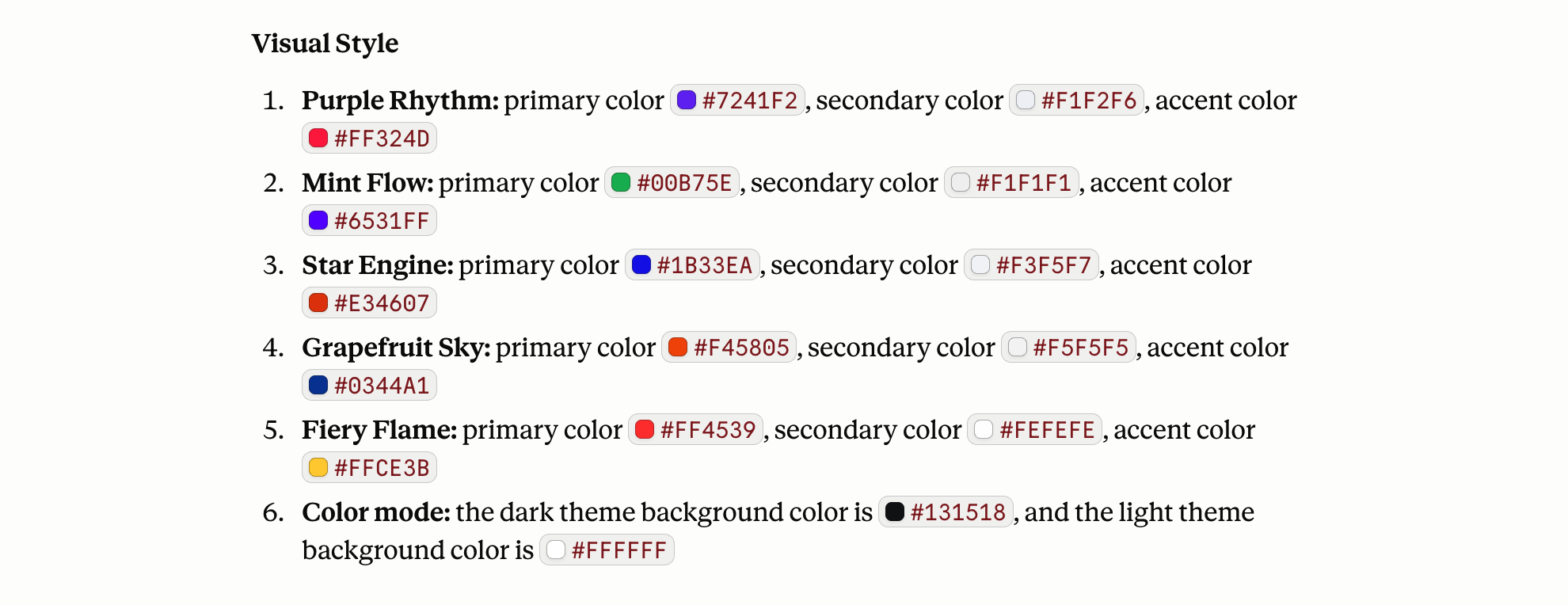
Case 1: Fitness App
For the first test, I described a fitness app home page — daily workout stats and recommended courses — and selected the warm light-theme palette. That's the complete input.
The output was already close to what I had in mind: clean layout, good information hierarchy, premium feel without heavy customization. The prompt did the heavy lifting.
Case 2: Web3 Exchange
For this one, I described a Web3 exchange home page and selected the purple dark-theme palette. Having worked on fintech apps before, I pulled some of that product thinking directly into the prompt. The first output came back strong, with the layout handling the data-heavy content well and the visual hierarchy feeling right without any adjustments.
Case 3: Health And Nutrition Management
For the health app case, I described a health and nutrition management app and selected the mint light-theme palette. I kept the layout description brief intentionally — and the output held up well anyway, which says something about how much the visual system is doing.
Case 4: Online Video Platform
For the video platform case, I described an online video platform and selected the fiery red dark-theme palette. The preview inside Claude didn't render every asset cleanly, so I asked it to use placeholders instead.
Case 5: Logistics Management System
For the last one, I described a logistics management system and selected the blue light-theme palette. Logistics interfaces tend to carry a lot of text-heavy business information, so I went with light mode deliberately — it keeps the content readable and makes dense copy easier to scan. The style pairs blue and gradient with orange accents, and the result holds up well even with a full set of business data on screen.
2. Continue Optimization In Cursor
If you want to refine the details further, Cursor is the more efficient path. Copy the generated code from Claude, open Cursor, paste it into a new file, and create a separate .md file to hold your role and style references. From there, you can make precise edits directly in code without touching the prompt again.
3. Retrospective
Prompt quality comes from what you bring in:
- The more domain knowledge and taste you bring to the prompt, the better the output gets
- A clear color system with specific color values gives the model something concrete to follow — and that's what keeps different product directions from converging toward the same default aesthetic
For detail-level refinements, Cursor is more efficient than iterating inside the AI client:
- Media-heavy pages need real assets — import the project into Cursor and swap placeholders for quality open-source files
- Complex business logic and interaction details are faster to adjust directly in code than through prompts
- Because the visual style is already locked in, you can edit freely without breaking the design